Your launch,in lights.
Type it, say it, or drop in your logo and notes. Marquee designs, writes and builds the landing page, then changes anything you ask for in the chat.
Free to start, no card needed. Every page is responsive, accessible and yours to download.
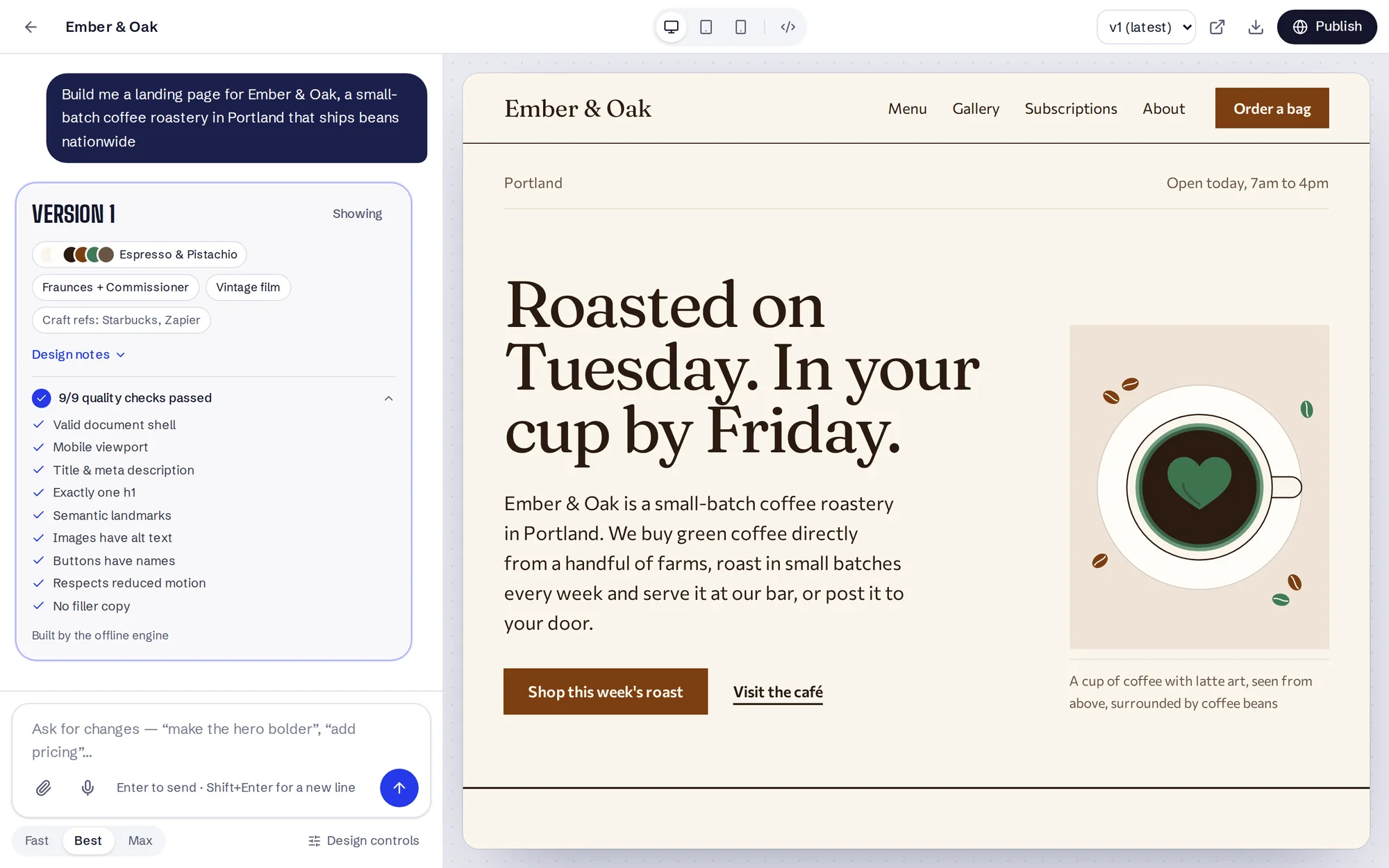
“Build me a landing page for my coffee roastery called Ember & Oak in Portland”
“Remit, a SaaS tool that helps freelance designers send invoices and get paid faster”
“Ringside Brooklyn, a boxing gym for beginners and amateurs”
“Landing page for Tracewell — AI observability platform for ML teams”
“Loop Club, a kids coding camp summer program”
“Landing page for a wedding photographer in Lisbon named Sofia Marques”
“Fernwood, six off-grid cabins in the Blue Ridge Mountains”
“Landing page for a band called The Paper Lanterns from Glasgow”
“Marsh Whitfield LLP, an immigration law firm in Toronto”
“Small Hours, a weekly podcast about urban gardening”
“Pipe & Pressure, a family-run plumbing company serving Leeds”
“Saltwater, a yoga and breathwork studio in Byron Bay”
“Proof & Crumb, a sourdough bakery in Montreal”
“The Fluff Room, a dog grooming business in Austin”
Same chat bar.
Very different pages.
Each page below was built from the sentence under it. A roastery doesn’t get the layout of a database tool, and a wedding photographer doesn’t get the palette of a boxing gym. Open any of them to scroll the whole page or see it on a phone.
From one sentence to a published page
Describe it
Type, dictate, or attach a logo, photos, a deck or notes. A thin brief is fine: Marquee fills the gaps and tells you what it assumed.
Watch it build
First you see the plan (palette, type and layout), then the page assembles in the preview as it’s written.
Refine by chatting
“Make it feel more premium.” “Add pricing.” “Use my photo in the hero.” Every revision is saved as a version.
Publish or export
Share a live link in one click, or download a single HTML file and host it anywhere you like.
Taste, built in.
Every brief is matched against a design library distilled from the best open-source design work, and every version is checked before you see it. You get a point of view, not an average.
In the library
- Contrast-checked palettes
- 52
- Type pairings
- 40
- Design directions
- 35
- Industry playbooks
- 42
- Brand systems studied
- 74
Choose Max quality and a second pass reviews the draft like a design director, hunting for generic choices, weak copy and accessibility gaps, and rebuilds what doesn’t hold up.
Checked on every version
- One clear headline and a call to action above the fold
- AA colour contrast, including text on images
- Keyboard focus, labels, alt text and landmarks
- Holds up from a 360px phone to a wide monitor
- Motion that respects reduced-motion settings
- Specific copy, with no lorem ipsum and no buzzwords
- Menus, dialogs and forms wired to real targets
- On full sites, every link clicked to check it lands somewhere
The library is distilled from open-source work byanthropics (anthropics/skills on GitHub, opens in a new tab), nextlevelbuilder (nextlevelbuilder/ui-ux-pro-max-skill on GitHub, opens in a new tab), VoltAgent (VoltAgent/awesome-design-md on GitHub, opens in a new tab), superdesigndev (superdesigndev/superdesign-skill on GitHub, opens in a new tab), greensock (greensock/gsap-skills on GitHub, opens in a new tab) and vercel-labs (vercel-labs/agent-skills on GitHub, opens in a new tab).
Free to build.
Pro when you launch.
Building, publishing and downloading pages costs nothing. Pro takes our name off your pages and lets you choose their links, for $24 a month, or free for a month each time a friend you invite publishes their first page.
Studio is everything in Pro plus 5 brand kits, 3 team seats, 5× usage limits and priority support, for $79 a month. Monthly, cancel any time.
| Free | Pro | Studio | |
|---|---|---|---|
| Build pages and whole sites from text, voice and files | Included | Included | Included |
| Refine by chatting, with every version saved | Included | Included | Included |
| Publish to a share link with a QR code | Included | Included | Included |
| Sign-ups from your page land in your leads inbox | Included | Included | Included |
| “Made with Marquee” strip under your page | Shown | Yours to hide | Yours to hide |
| Your page’s link name | Picked for you | You choose it | You choose it |
| Brand kits | 1 | 1 | 5 |
| Team seats | Just you | Just you | 3 |
| Usage limits | Standard | Standard | 5× |
| Support | Standard | Standard | Priority |
| Price | $0 | $24a month, or free by invitation | $79a month |
| Start free | Get Pro | Get Studio |
Questions
What can I put in the chat bar?
A sentence is enough: what you’re launching, who it’s for, and anything you care about. You can also speak instead of typing, and attach your logo, product photos, a PDF deck or a notes file. Marquee reads them and puts your real images on the page.
How is this different from a template?
Nothing is picked from a gallery. Each brief is matched to a design direction, palette and type pairing for that kind of business, then the page is designed and written from scratch and checked against a list of generic-design tells before you see it.
Can it build a whole website, not just one page?
Yes. Choose Full site, or just ask for a website. Marquee first shows you a site map (every page, its sections and where every button goes) and builds nothing until you approve it. Then it builds the pages one by one in a shared layout and clicks every link to make sure none is a dead end.
Can I change it after it’s built?
Yes. Keep chatting. Ask for a darker look, a pricing section, a different headline or a calmer tone, and it revises the page while keeping what you liked. Every revision is saved as a version you can go back to.
Can it redesign my current site, or match one I like?
Yes. Paste a link in the chat bar: “redesign https://mybakery.com” or “make it feel like https://linear.app”. Marquee reads the page’s colours, fonts, headings and copy, then rebuilds your site with your real words, or borrows the reference’s mood without copying its brand.
Do I own the page?
Yes. Publish it to a share link in one click, or download a single, self-contained HTML file and host it anywhere.
Will my visitors’ sign-ups reach me?
Yes. Every form on a published page (waitlists, newsletters, booking requests) lands in your leads inbox, with a CSV export for your email tool. You also see how many people visited this week.
What’s the “Made with Marquee” strip?
Free pages show a slim strip under your footer. Pro hides it. You get Pro by inviting a friend: when they publish their first page, you both get a month.
Is there a paid plan?
Yes. Building, publishing and downloading stay free. Pro is $24 a month (or free for a month each time a friend you invite publishes their first page) and Studio is $79 a month. Both are monthly through Stripe, and you can change or cancel any time from Manage billing.
Does voice input work everywhere?
Live dictation works in Chrome, Edge and Safari. Other browsers can record and transcribe when the server has transcription turned on.
What are you launching?
Start with one sentence. You’ll make an account when you press Build, and your brief comes with you.